CASTp is a free to use online resource that can be found here. Using CASTp, it’s possible to find binding pockets within a macromolecule, and that helps with molecular docking as you attempt a conformational search within a certain search box. After this tutorial, you’ll be able to gather all the residues from a CASTp result, and also obtain the search box needed before any docking procedure.
Prerequisite:
- Python 3
Getting on CASTp
First let’s get on CASTp if you haven’t done so already. Use this link.
Now, click on the “Calculation” tab up at the top. On this page it wants you to upload a PDB file format of your molecule. I’ve already cleaned this one up for you for this tutorial (chain C of PDB code 5QCO). Unzip the file, upload the PDB file I’ve given you here, or one of your own, and leave all other settings the same, afterwards clicking “Submit”.
A pop-up will appear informing you that you’ve created a new job on their servers. On that pop-up is a link that you need to click.

Like the popup said, you may need to wait in order to receive your results so be patient. After they’re done, you can refresh the page and they’ll appear. You’ll see a 3D model like this:
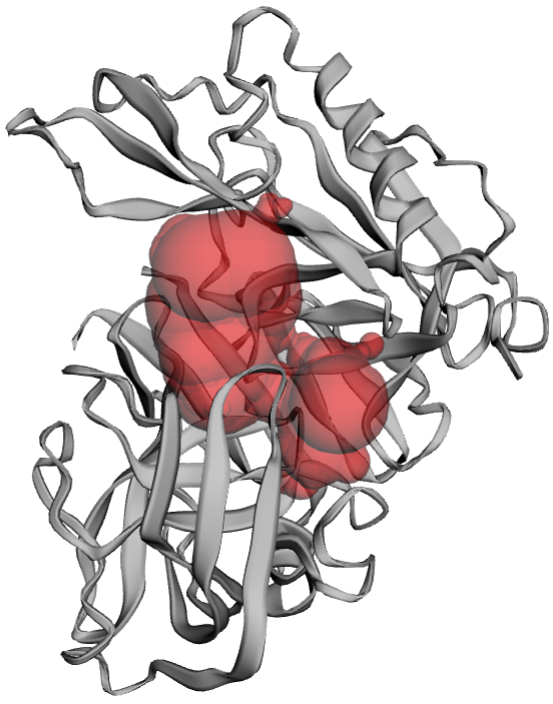
Those red bubbles are the binding pocket regions. On the right of this model you’ll see one binding pocket, and a scrolling list of all the residues that are within it.
Now, you could select all of the residues within the binding pocket by hand, and then shape the docking region by eye, but well, that’s way too much work. I mean, just look at how many residues we have here? Would you really want to do it all by hand?
There’s no worries cause I scripted a quick solution!
First, click the download button that’s directly above the job name (job name is usually something like J_INSERT NUMBERS AND LETTERS HERE) and then unzip the file you’ve just downloaded. Next download this and unzip it. That’s the script I made to make life much easier. Place the script.py file into the unzipped folder that you previously downloaded (the one from CASTp). Open up your command prompt or terminal and go into the same directory as where you put the script.py file. Now, to use my script you’ll need to write along these lines, filling in the square brackets with the needed values. It goes like this: “python script.py [.poc FILE HERE] [BINDING POCKET ID HERE]”. For me, all it took was “python script.py j_62cb69096eac2.poc 1” to receive the information needed for the docking search box.
You’ll see three things listed after you run the command:
- All of the residues from that scrolling list
- The xyz center coordinates of the grid box
- The xyz sizing values of the grid box
Viola! You now have the information you need to finally perform docking.